

In daily use at a mortgage lender · Works with LendingPad
The work your LOS doesn’t do.
Which is most of it: what’s late, who’s on the hook, what the borrower was told, and proof it happened. NinthOar reads your loans as they change and puts what needs a person in front of the person — before anyone has to ask.
Opening to new lenders soon. No new data entry: it works from the loan data already in your LOS.


The problem
Every morning, someone asks what’s stuck.
Your LOS knows the status of every loan. It doesn’t tell anyone what to do about it. So the answer lives in a spreadsheet, a group chat and three people’s heads — until one of them is out.
“Which locks expire before the file can close?”
Every lock is compared with the loan’s funding date as soon as either one moves, and a gap shows up with the loan officer’s name on it — days before, not the afternoon it lapses.
“Did the CD go out — and has everyone signed?”
Every disclosure is tracked from request to signature against its deadline, and the desk sees which ones must go out today and which borrowers haven’t signed yet.
“Who has this file right now?”
Each desk works one list that says who has each item and how long it has waited. Nothing sits in an inbox nobody is watching.
A tour
One place for the work that happens around every loan.
Everything below is the real product. The live examples run in your browser with made-up data; nothing you click changes anything.
Work queues
Every desk works one list, in deadline order.
Disclosures — closing packages included — locks and file setup each get a queue. Work arrives as it is requested or as files move in the LOS, sorts by what’s due first, and is claimed by a person — so “who has it?” always has an answer.
- Deadlines, computed. Initial and closing disclosure due dates, consent windows and sign-by dates are worked out for you.
- One list across desks. A manager sees everything waiting, from every desk, in one view.
- Other desks’ alerts, inline. A disclosure on a loan whose lock is expiring says so, right on the row.
The loan page
One loan, one page, the whole story.
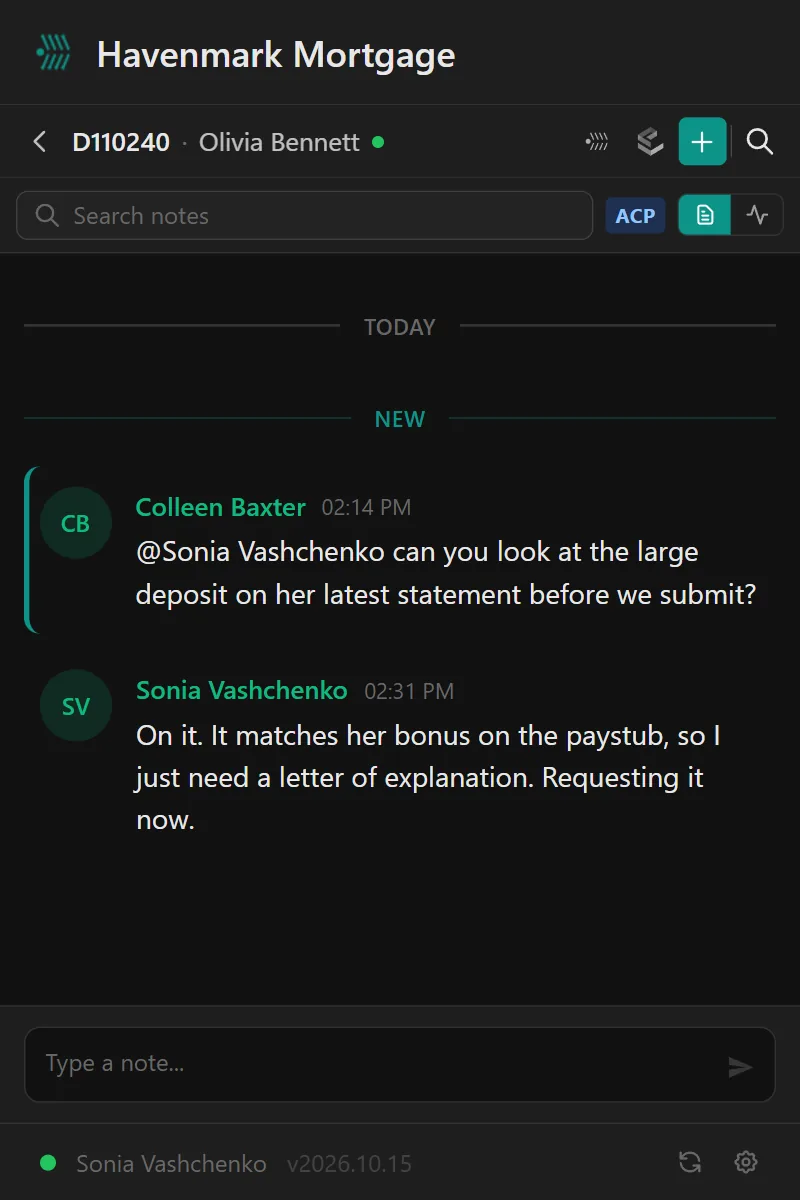
Health at a glance, the milestones it has passed, every disclosure and who has signed it, the lock, the closing — and a running thread of notes where the team @mentions each other instead of forwarding email.
- A health score that explains itself. Open it and it tells you why: lock expires in two days, consent still pending.
- What the borrower was sent, from whom and when — in the file, not in someone’s mailbox.
- Links back to the file in LendingPad, from every loan.
- Your team hears about it the moment it happens. A borrower signs or texts, and everyone on the loan gets a pop-up, with Reply right on it.
Borrower texting
Borrowers text the loan, not someone’s cell phone.
Each loan officer gets a business number, and every text in and out lands on the loan — so the processor, the assistant and the closer read the same thread, and it is still in the file when the loan officer is out.
- Consent on record before anyone texts, if your company requires it.
- STOP honored automatically, with the opt-out on the team’s list.
- Delivered or not, you can see it — and who on the team sent each text.
Closings
The closing calendar everyone actually works from.
Every scheduled closing, color-coded by where the file really is, with holidays and rescission periods marked. Open a closing for its checklist, its notes and its lock; put it on hold and everyone on the file hears about it.
- Holds that interrupt. A hold reaches the loan officer, assistant and processor immediately, with the reason.
- Balance alerts. Once a closing is balanced, any change to its figures from the LOS is caught and shown side by side — before the borrower signs the wrong numbers.
Compliance training
The record answers for itself.
Assign BSA/AML and your own courses, run the exam, issue the certificate, and track who acknowledged which policy. When an examiner or an investor asks what someone was trained on and when, there is one answer — and it cannot have been changed after the fact.
- Immutable by design. Submitted exams, certificates and published versions can’t be edited or deleted — not by a manager, not by an admin, not by us.
- Reminders that escalate before training is due, so nobody finds out at the audit.
Management reporting
“Why did that file take 45 days?” — with an answer you can defend.
Turn times by stage, files likely to miss their closing date or outlast their lock — flagged before the date — and the statistics to tell a real change in the process from an ordinary bad week.

On a phone
Built for a phone, not squeezed onto one.
Away from the desk the questions are short: what closes today, what’s stuck, who has it. On a phone the pipeline is a list of cards, the closing calendar is a month you tap through, and every window fills the screen — in the phone’s browser, with nothing to install.
- Loans, Calendar and Queue on a tab bar under your thumb, from any screen.
- Tap a day, then a closing. Its details fill the screen, and the phone’s Back button closes them.
Works with LendingPad
Your team never leaves the system they’re already in.
Software fails when nobody opens it. NinthOar’s side panel opens beside the loan in LendingPad: that file’s notes, its borrower’s texts, what needs attention — without a second login or a second tab.
- It follows the loan you have open. Switch tabs and it switches loans.
- Loans sync as they change — status, dates, team and lock — and every loan links back to the file in LendingPad.
Everything it covers
Built for the people who run the pipeline.
Needs Attention
Locks about to expire, disclosures due, closings on hold and credit about to lapse — with a name on each — before anyone has to ask.
Learn moreWork queues
One list per desk — disclosures, locks, file setup, closings — sorted by deadline, claimed by a person, and nothing waiting in an inbox.
Learn moreThe loan page
Everything about one loan on one screen: health, milestones, disclosures and who has signed, notes with @mentions, and what the borrower was sent.
Learn moreBorrower texting
Borrowers text the loan, not someone’s cell phone. The whole team sees the thread, consent is on record, and STOP is honored automatically.
Learn moreThe side panel
Notes, alerts and borrower texts beside the loan open in LendingPad — a Chrome side panel that follows the file on screen.
Learn morePhones and tablets
The pipeline as cards, the closing calendar as a month you tap through, and a tab bar under your thumb — in the phone’s browser, nothing to install.
Learn moreClosings
A closing calendar the whole team works from, with each closing’s checklist, holds that alert everyone, and a check against what changed since approval.
Learn moreCompliance training
Training and policy acknowledgments with records nobody can edit or delete — not a manager, not an admin, not us.
Learn moreManagement reporting
Turn times by stage, files at risk of missing their date, and the difference between a real change and an ordinary bad week.
Learn moreRoles, branding & help
Every permission set per role, with exceptions per person; your name, logo and color on every screen and email; and a help center that answers before anyone emails.
Learn moreGetting started
Live on your own pipeline, without a migration.
There is nothing to move. Your loans stay in your LOS; NinthOar reads them.
Your own instance
We set up a NinthOar instance for your company alone — your name, your logo, your color, your address.
Connect LendingPad and sign-in
Loans start flowing from LendingPad, and your team signs in with Microsoft 365 or Google — no new passwords.
Set it to how you work
Choose who sees what, which desks you run and who gets which alerts. Every default can be changed per role or per person.
For IT and compliance
Built to be vetted.
Your company’s data lives in its own instance, behind the sign-in your IT team already manages, with every permission visible and every change to access recorded.
- Single sign-on through Microsoft 365 or Google Workspace.
- Role-based access with per-person exceptions, and a screen that shows who can do what and why.
- Audit trails on access changes and compliance records that can’t be quietly rewritten.
Questions
What people ask first.
What is NinthOar, exactly?
Operations software for mortgage lenders. It reads your loans from your loan origination system and turns them into the things your LOS doesn’t do: a list of what needs a person today, work queues for each desk, a closing calendar, a page per loan with its whole history, borrower texting the whole team can see, compliance training with records that can’t be edited, and turn-time reporting for management.
Your loan officers keep originating in the LOS — with a side panel that brings NinthOar into the loan they have open. NinthOar is where operations sees what’s late, who has it, and what happened.
Does it replace our LOS?
No. Your LOS stays the system of record. NinthOar sits beside it, works from the loan data already there, and links back to the file in your LOS from every loan it shows.
Which loan origination systems does it work with?
LendingPad today. Loans flow in as they change in LendingPad, so the pipeline you see matches the one in your LOS. If you run something else, tell us what — the next integration is chosen by what lenders actually use.
Is it for delegated or non-delegated lenders?
Both. The daily operations side — what’s at risk, the desks, closings, the loan page, compliance training — applies to every lender. Delegated lenders also get underwriting turn times and conditions in their reporting.
Will it look like our company or like yours?
Yours. Each lender runs its own instance with its own name, logo and brand color, on the app screens and in every email it sends. Borrowers see your company, not ours.
How does our team sign in?
With the accounts they already have — Microsoft 365 or Google Workspace. Your multi-factor rules and offboarding apply automatically: turn off someone’s work account and their access goes with it.
Who decides what each person can see and do?
You do. Every permission is set per role, with exceptions per person, and a screen that shows exactly what anyone can do and why. The defaults match how most shops work, and every one of them can be changed.
Is anyone using it in production?
Yes. NinthOar was built inside a working mortgage lender and runs their pipeline every day. That is where every screen on this site came from.
Early access
Opening to new lenders soon.
NinthOar is in daily use at a lender today. Tell us about your shop, and we’ll reach out as soon as we can take you on.